
Injection site tracker: where you've injected, and how recently
If you searched for an injection site rotation tracker, here is what Peptimes does. It records the site of each injection you log, and shows where you've injected and how recently on a body map in Insights. It doesn't tell you where to inject next, and it doesn't plan a rotation for you. Where and how to inject is between you and your prescriber, and your medicine's own instructions for use.
What you get is a dated record of your own injections that you can look through, check against your memory and bring to an appointment.
Injected routes only
Peptimes asks for an injection site only when the route is subcutaneous or intramuscular. Sites aren't recorded for oral, nasal, sublingual or topical use. Which routes you can choose depends on the compound you're logging.
How a site is recorded
When you log an injected dose, Peptimes asks for the site after the route. Choose from the app's list (areas of the stomach, thighs, deltoids and glutes), or pick Other and type your own description.
When you log a dose at the time, the site is required. When you record a dose for an earlier day, from the past days on Home or from the Calendar, it's optional: add it if you remember it. A dose without one shows "Site not recorded". If you chose the wrong site, open the dose and edit it.
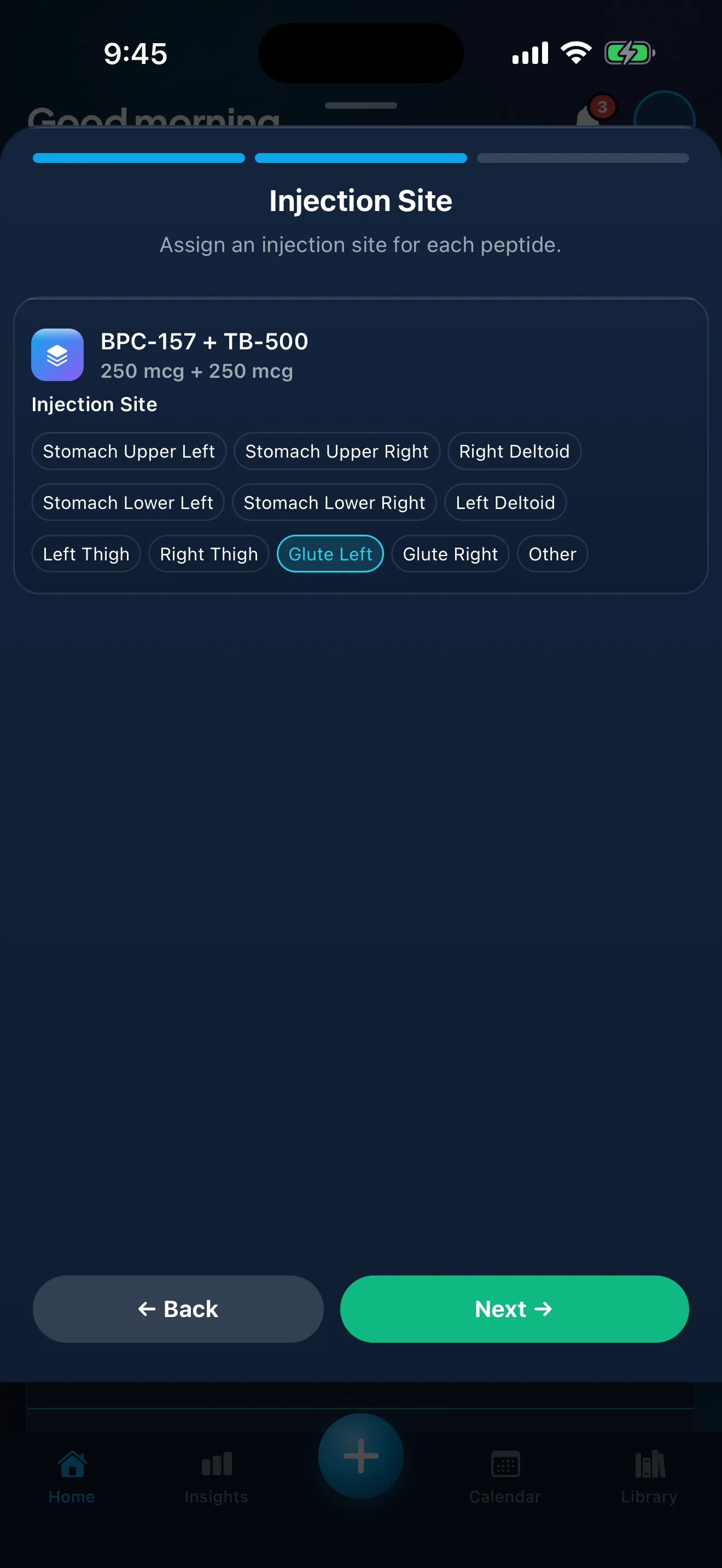
Sample data. The amounts are what a demo person entered, not advice.
How the history appears
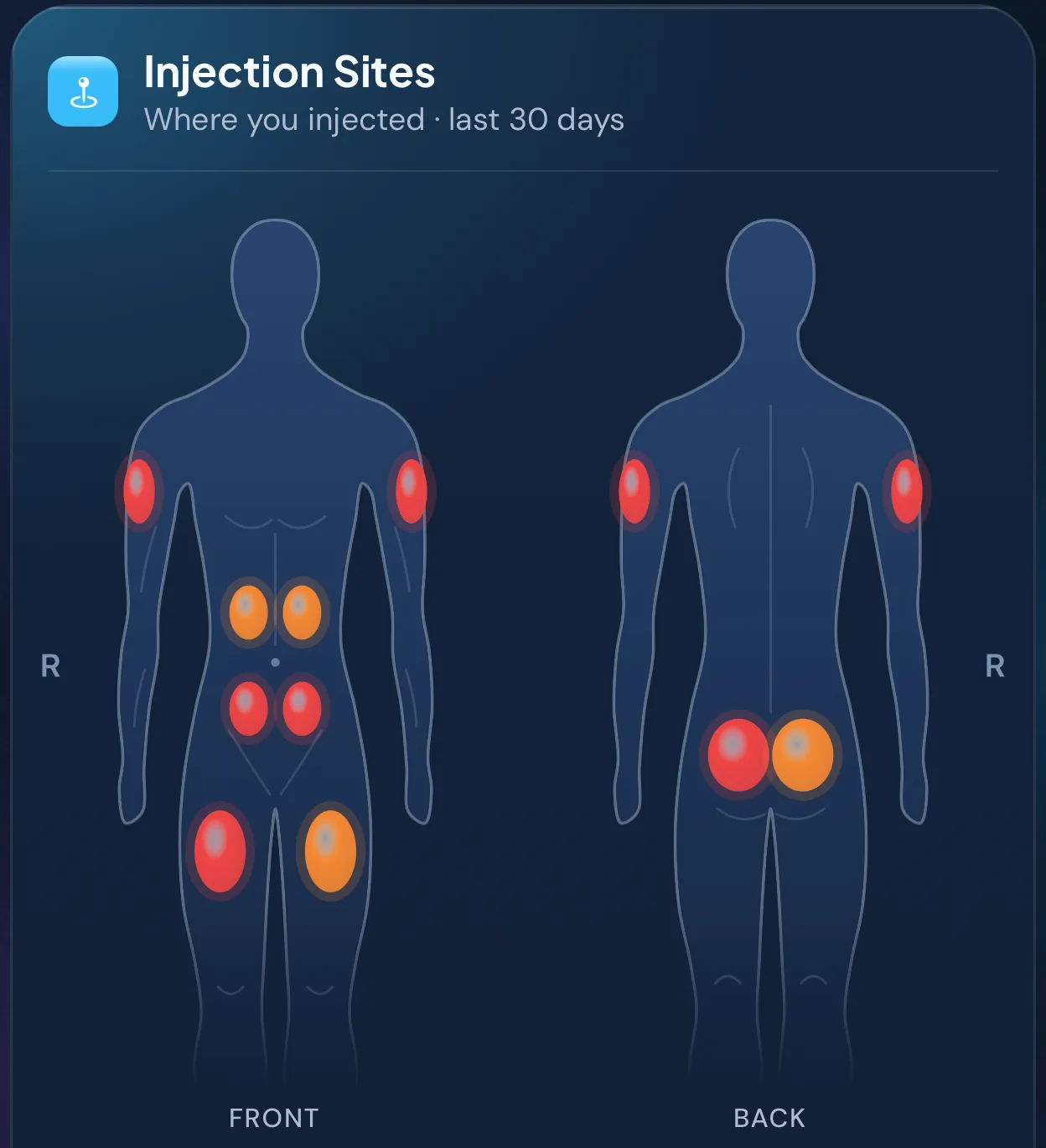
In Insights, the Injection Sites card ("Where you injected", for the time range you pick) shows a front and back view of a body, with each site you've logged shaded by how long ago you last logged it. The time range at the top of Insights (7 days, 30 days, 90 days or All) sets which doses the card counts.
Below the map, the sites you used in that range are listed, most recent first, each with how many times you used it and when you last used it. If you noted a reaction at the site when you logged a dose there (pain, redness, swelling or itching), the site also shows how many of its doses had one. Reactions you note in a daily check-in aren't counted here. Tap a site to see its doses.
The card's own note says: "Doses taken another way, or logged without a site, aren't included." The card appears once you've logged an injection with a site in the range.
What Peptimes doesn't do
Peptimes doesn't pick a site for you, warn you about reusing one, plan a rotation or explain injection technique. Those questions are for your prescriber and the instructions that come with your medicine. Drug labeling that companies submit to the FDA is published on DailyMed, a service of the National Library of Medicine.
Why keep a record of sites
A site history is a log like any other. It lets you check what you did instead of relying on memory, and it gives you something concrete to look back over with your prescriber if either of you wants to. Your injection logs are part of what you can export as CSV or JSON. Peptimes doesn't keep a copy of your records on its servers, so export your data to keep one. The guide to exporting your records shows how.
Peptimes records sites the same way for every injected compound you log, whether that's a GLP-1 medication, testosterone or a peptide. Your health records are stored on your iPhone, and there are no ad trackers. How Peptimes handles your data has the details.
FAQ
Does Peptimes tell me which injection site to use next?
No. Peptimes shows where you've injected and how recently. It doesn't recommend a site. Ask your prescriber, and follow your medicine's instructions for use.
Can I track sites for oral, topical, nasal or sublingual doses?
No. Injection sites are recorded only for subcutaneous and intramuscular doses. You can still log those other routes as doses.
What if I forgot to choose a site?
When you log a dose, a site is required. If you recorded an earlier day's dose without one, it shows "Site not recorded". You can edit the dose later to add the site.
How far back does the body map go?
It follows the time range you pick at the top of Insights: 7 days, 30 days, 90 days or All.
Is Peptimes on the App Store yet?
Not yet. It's coming soon to the App Store, as an iPhone app only.
Coming soon to the App Store
See planned pricing