
Keeping records when your medicine, brand or pharmacy changes
Sometimes a prescriber changes what you take, its brand or form, or the pharmacy that fills the prescription. A log can get muddled at that point: an old name beside a new amount, or an entry that doesn't say which product it refers to. A short note made on the day, and a few habits afterward, keep the before and after clear for you and for whoever reads your log next.
This guide covers what to write down. It doesn't say whether, when or how to change a medicine, and it doesn't compare products or convert amounts between them. Those are decisions for your prescriber, with your pharmacist's help. Everything here works with a notebook or a spreadsheet, and the last section covers Peptimes.
Your prescriber decides; your records follow
Your prescriber decides what you take, in what form and in what amount. Your pharmacist can explain what is printed on a label. FDA says pharmacists can help you understand a prescriber's instructions and the materials that come with a medicine.
If a new label or instruction doesn't match what you were told, or you can't tell what it means, ask your pharmacist or prescriber before you use the product, and write down their answer. Don't carry numbers over from the old label, and don't assume the new product works like the old one. The new label and your prescriber's instructions are what apply.
What to write down when the change happens
Write these down when you get the new prescription or product, while the details are in front of you.
- The date of the change and how you heard about it. The day your prescriber told you, and whether it was at a visit, by message or by phone. Add the date you started using the new product, which may be a different day.
- The old and new product names, exactly as printed on the labels. Copy the full text: the name, the strength as worded, the form, and the manufacturer or pharmacy if it's printed. Don't shorten a name, and don't swap one name for another (a brand name for an active ingredient, or the reverse). How to read prescribing information on an FDA label explains the parts of a label.
- The amount, unit and route, as written on the new prescription or label. Copy them. Don't convert, round or work them out from the old ones. The same number in a different unit is a different amount, and what mg, mcg, mL and IU measure explains the units.
- What you were told to do, in their words. Note what your prescriber or pharmacist said about starting the new product and about the old one, who said it and when. Use their words, not your reading of them. If you aren't sure what they meant, ask again and write down the answer.
- Who and where. The prescriber, the pharmacy, the date you picked the product up, and the dates of your last entry for the old product and your first for the new one.
- Paperwork and packaging. Photograph the old label before the packaging goes in the trash, and photograph the new one. Some prescription medicines come with a Medication Guide, which FDA says must be given to the patient with certain prescription drugs when they are dispensed. Keep the new one with your records.
- How you felt in the days around the change. Dated notes in your own words, including days when you noticed nothing. Add anything else that was different in the same days, such as travel, illness or a new routine. Write what you observed apart from what you think caused it. How to keep a side effect log covers the habit.
- Questions for your next appointment. Write each one down with the date it came up, so it isn't lost by the visit.
FDA advises reviewing and updating a list of your medicines often, for example when you start a new prescription, change a dose or stop a medication. If you keep a list, update it the day you write your change note.
A change note to copy
Copy this into your notes or log and fill it in. It has no example products or amounts on purpose.
- Date of change: [date]
- Told to me by: [prescriber], [at a visit / by message / by phone] on [date]
- Before: [name exactly as on the label] · [amount and unit as written] · [route] · [pharmacy]
- After: [name exactly as on the label] · [amount and unit as written] · [route] · [pharmacy]
- What I was told to do: [their words, and who said them]
- Last entry for the old product: [date]. First entry for the new product: [date]
- Notes in the days around it: [dated notes]
- Questions for my next appointment: [list]
Keep the before and after side by side
- Leave old entries as they are. They record what you used at the time. Don't rename the product or recalculate an amount in an old entry to match the new one. Correct an old entry only if it was a mistake when you wrote it.
- Start new entries with the new product. Use the name and the amount as written on the new label.
- Make each entry say which product it is about. In a paper log, draw a line under the last old entry and put the change note there. In a spreadsheet, add a column for the product name as printed.
- Check your reminders against the new instructions. Compare the name, amount, days and times in each reminder, calendar entry or app schedule with what your prescriber now says, and remove any that belong to an arrangement that has ended, so they aren't mistaken for a current instruction. If you aren't sure which still apply, ask. How to remember a weekly injection day covers setting reminders for a schedule your prescriber has set.
When only the pharmacy or packaging changes
Sometimes the prescription stays the same and the label doesn't: a different pharmacy, manufacturer or package. Note the date, the new pharmacy or manufacturer, and anything printed that differs from last time. If something doesn't match what you expected, ask the pharmacist to explain it before you use it, and write down what they say.
Bring it to your next appointment
Bring the change note, the label photos and your dated notes, and ask how your prescriber would like to see them. What to bring to an appointment covers the rest of the visit, and sharing your medication log with your doctor covers sending a file.
How Peptimes helps
Peptimes is a private iPhone tracker. In My Protocols you enter your own schedules (times per day, days of the week and a start date). After a change, you set the schedule to match what your prescriber told you, and the doses you've already logged stay in your history.
Dose History lists every dose, newest first, with search and a chip for each compound, so the records before and after a change are easy to find. Peptimes records the active ingredient, which is the Library entry, and has no separate field for a brand, product or pharmacy. Add the brand or pharmacy in the dose's notes. You can write your change note in the daily check-in notes next to how you felt that day. When an appointment is coming, export your records as a CSV or JSON file. Your health records are stored on your iPhone. Peptimes doesn't keep a copy of your records on its servers, so export your data to keep one, and see how to store your records safely.
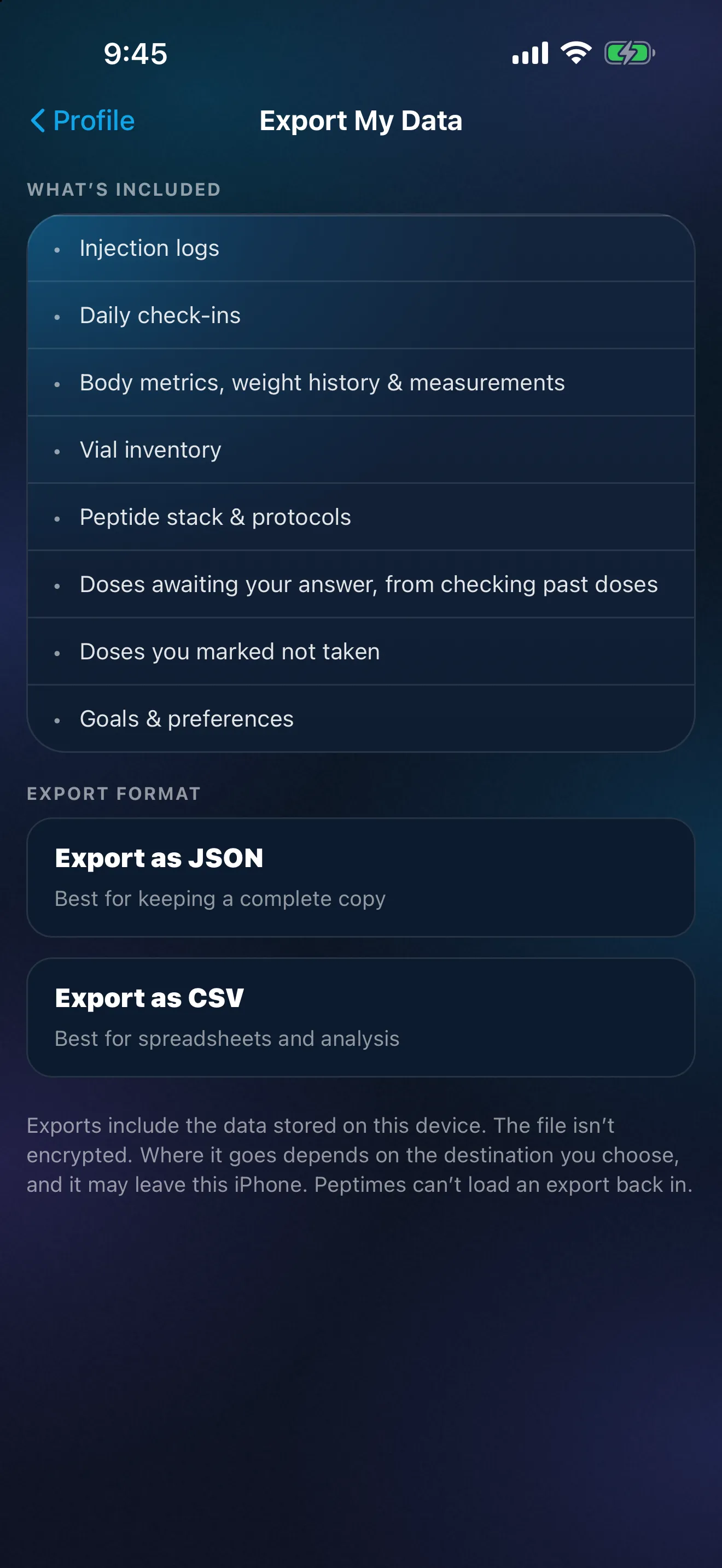
Peptimes is coming soon to the App Store. How Peptimes handles your dataexplains where your records are stored.
FAQ
Should I edit or delete my old entries after a change?
Not to match the new product. Old entries record what you used at the time. Correct one only if it was wrong when you wrote it.
Can Peptimes tell me how an old amount compares with a new product's amount?
No. Peptimes records the amounts you enter, and never fills in or suggests one. Questions about a new product are for your prescriber and your pharmacist.
Sources
- U.S. Food and Drug Administration, "Create and Keep a Medication List for Your Health", checked 25 Oct 2026 (content current as of 01/08/2025, as shown on the page): what a medication list contains, and reviewing and updating it often, for example when you start a new prescription, change a dose or stop a medication.
- U.S. Food and Drug Administration, "Medication Guides", checked 25 Oct 2026 (content current as of 08/19/2024, as shown on the page): a Medication Guide is patient labeling for certain prescription drugs and is required to be dispensed to the patient when the product is dispensed.
- U.S. Food and Drug Administration, "FDA Pharmacists Help You Use Medicines Safely", checked 25 Oct 2026 (content current as of 08/31/2023, as shown on the page): pharmacists can help interpret prescriber instructions and pharmacy materials.
Coming soon to the App Store
See planned pricing